> ## Documentation Index
> Fetch the complete documentation index at: https://help.experro.com/llms.txt
> Use this file to discover all available pages before exploring further.
# Authentication
Welcome to the Experro API guide. This page covers both **authentication**—how to generate and manage your API tokens—and **base URL selection** for Content and Discovery APIs.
All Experro API endpoints require a valid API access token and specific headers. You must have administrator privileges in the Experro Admin Panel to create and manage tokens.
## Authentication
### Obtaining Your Access Token
1. **Log in** to the Experro Admin Panel.
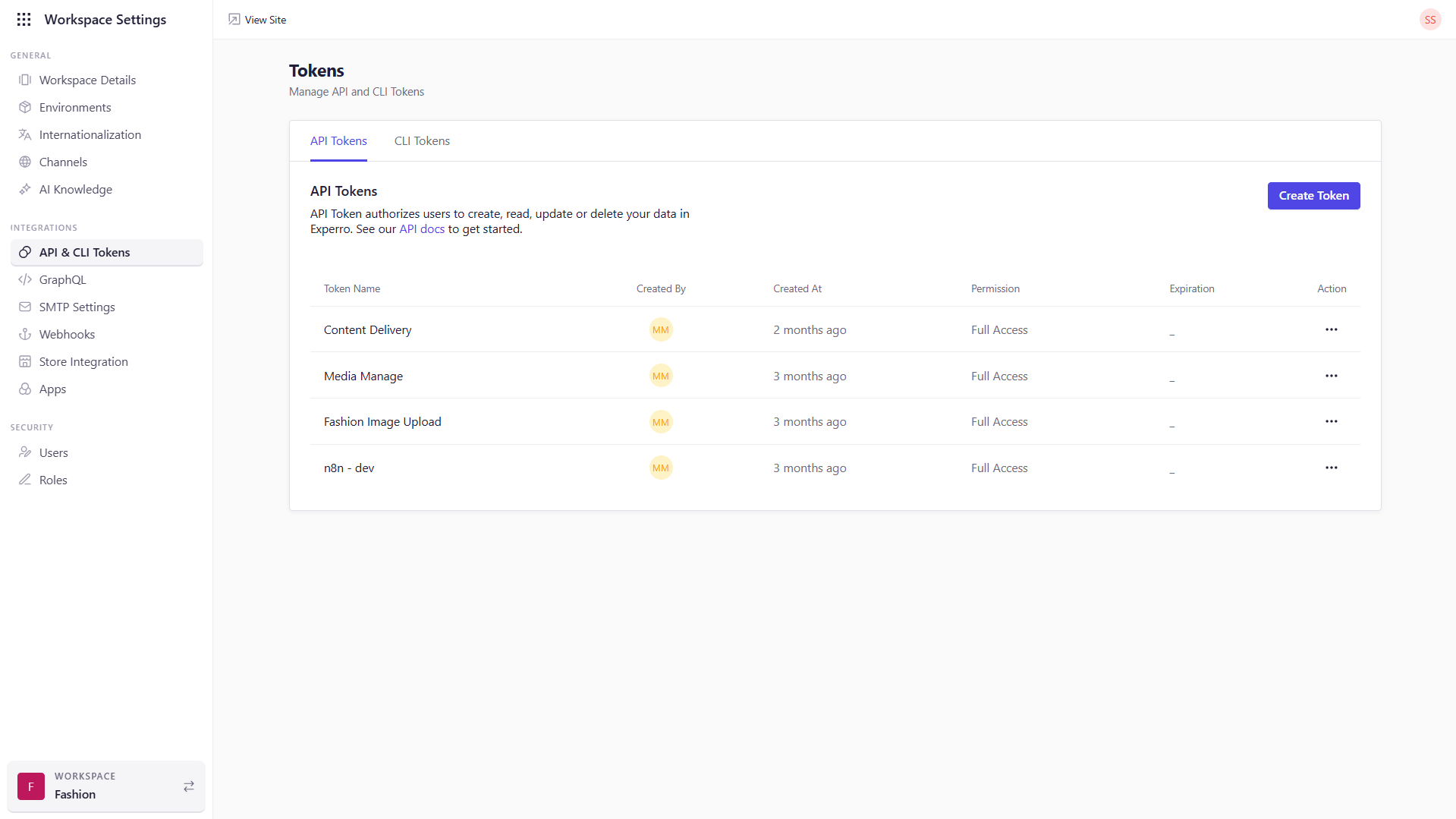
2. Go to **Workspace Settings → API & CLI Tokens**.
3. The **API Tokens** tab is selected by default.
 ### Viewing Existing Tokens
On the **API Tokens** screen, you’ll see a table with:
* **Token Name** — Unique label you assigned at creation.
* **Created By** — User who generated the token.
* **Created At** — Timestamp of creation.
* **Permissions**: *Read-Only* (GET only) or *Full Access* (GET, POST, PUT, DELETE).
* **Expiration** — Expiry date (blank means never expires).
### Creating a New Token
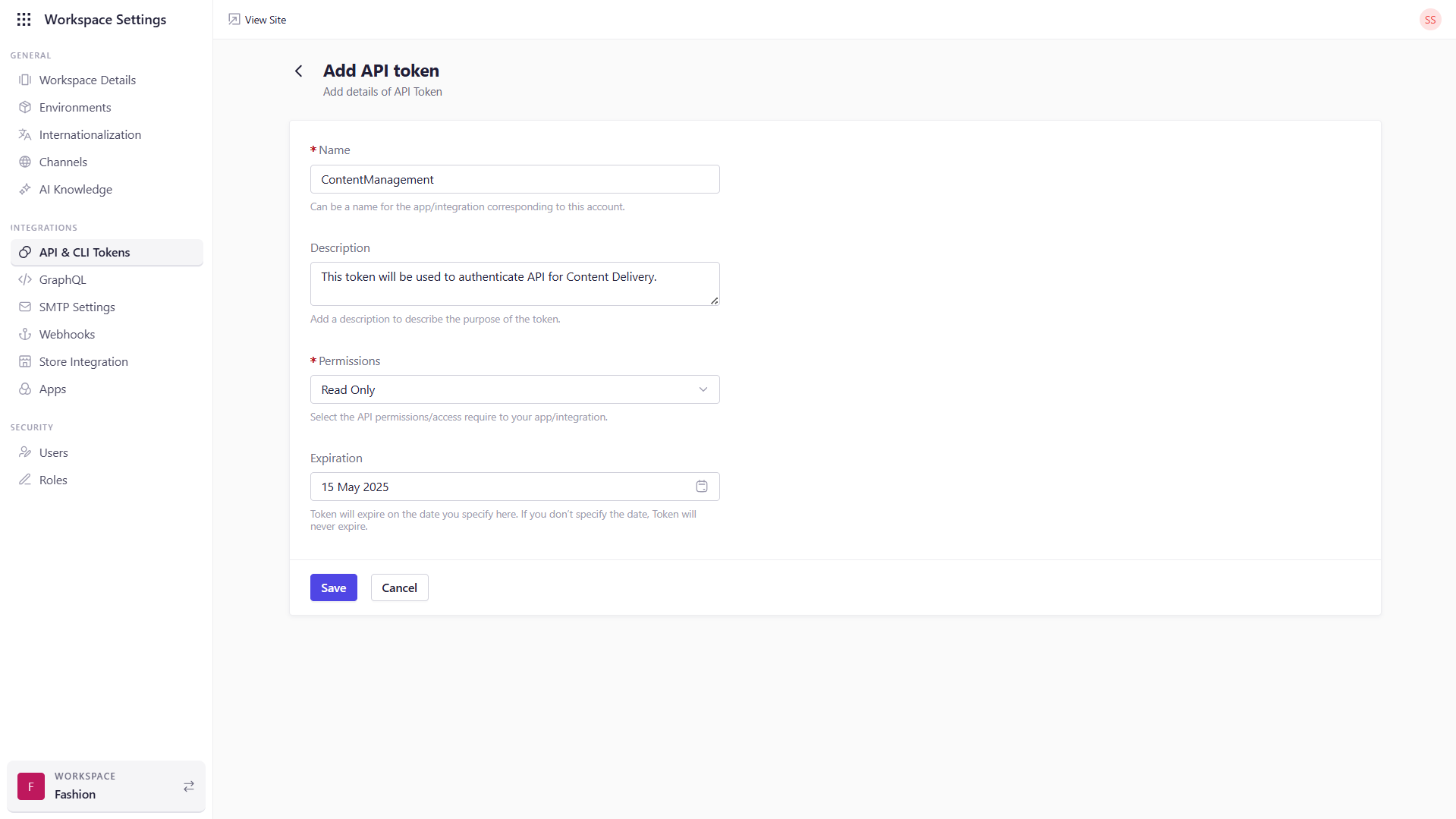
1. Click **Create Token**.
2. Fill in:
* **Name (required):** Descriptive name for your app/integration.
* **Description (optional):** Purpose of the token.
* **Permissions (required):** *Read-Only* or *Full Access*.
* **Expiration (optional):** Expiry date (leave blank for no expiry).
3. Click **Save**.
4. **Copy** or **download** the token when prompted—it’s shown **only once**.
5. Click **Done**.
### Viewing Existing Tokens
On the **API Tokens** screen, you’ll see a table with:
* **Token Name** — Unique label you assigned at creation.
* **Created By** — User who generated the token.
* **Created At** — Timestamp of creation.
* **Permissions**: *Read-Only* (GET only) or *Full Access* (GET, POST, PUT, DELETE).
* **Expiration** — Expiry date (blank means never expires).
### Creating a New Token
1. Click **Create Token**.
2. Fill in:
* **Name (required):** Descriptive name for your app/integration.
* **Description (optional):** Purpose of the token.
* **Permissions (required):** *Read-Only* or *Full Access*.
* **Expiration (optional):** Expiry date (leave blank for no expiry).
3. Click **Save**.
4. **Copy** or **download** the token when prompted—it’s shown **only once**.
5. Click **Done**.
 The token value is shown **only once**—copy or download it immediately!
### Fetching Required Headers
After downloading your token, the file contains:
* **Tenant ID** → `x-tenant-id`
* **Workspace ID** → `x-workspace-id`
#### Fetch `x-environment-id`
1. Go to **Workspace Settings → Channels**.
2. Locate the **ID** column for your channel.
3. Copy the Environment ID → `x-environment-id`.
#### Fetch `x-customer-group-id`
This value corresponds to your customer group ID in BigCommerce.
#### Set `x-ecomm-provider`
Value is your eCommerce platform (case-insensitive):
* `shopify`
* `bigcommerce`
* `magento`
## API Endpoints & Domains
Experro APIs are split into two main categories:
1. **Management APIs**
2. **Delivery APIs**
### Management APIs
These APIs power content CRUD operations. **Always** use the Experro-hosted domain for Management API calls:
```
https://apis.experro.app/{service}/{version}/...
```
**Examples**
```
https://apis.experro.app/content/v2/content-models
https://apis.experro.app/content/v2/records
```
**Required Headers**
| Header | Description |
| ------------------ | ------------------------- |
| `x-tenant-id` | Your tenant UUID |
| `x-workspace-id` | Your workspace UUID |
| `x-environment-id` | Environment ID |
| `accesstoken` | `Bearer {your_api_token}` |
### Delivery APIs
These APIs power search, autosuggest, recommendations, and content delivery to end-users. You can call Delivery APIs using either:
* **Custom domain** (your storefront or CDN endpoint)
* **Same Experro host as the management APIs** (using `apis.experro.app`)
#### Custom Domain
If you have a custom storefront or CDN domain, you can prefix the Delivery endpoints accordingly:
Locate the base URL in the following way:
1. Go to **Workspace Settings → Channels**
2. Open **Channel Settings**
3. Navigate to the **Languages** tab
4. Copy the URL from the **Language URLs** shown there based on your need and use it in the following format.
Choose the URL corresponding to the language and environment you need.
Until you’ve pointed your custom domain, you can use the Experro-hosted delivery domain. After you’ve configured your own domain, both will work but we strongly recommend switching to your actual custom domain for production.
```
https://{base-address}/apis..........
```
#### Same Experro host as the management APIs
You can also call these API using the same method as the management APIs i.e., using `apis.experro.app`
```
https://apis.experro.com/apis/........
```
**Required Headers**
| Header | Description |
| --------------------- | --------------------------------------------------- |
| `x-ecomm-provider` | eCommerce platform (`shopify`, `bigcommerce`, etc.) |
| `x-customer-group-id` | Customer Group ID from BigCommerce |
For more on token creation and header values, see this same page’s **Authentication** section above.
The token value is shown **only once**—copy or download it immediately!
### Fetching Required Headers
After downloading your token, the file contains:
* **Tenant ID** → `x-tenant-id`
* **Workspace ID** → `x-workspace-id`
#### Fetch `x-environment-id`
1. Go to **Workspace Settings → Channels**.
2. Locate the **ID** column for your channel.
3. Copy the Environment ID → `x-environment-id`.
#### Fetch `x-customer-group-id`
This value corresponds to your customer group ID in BigCommerce.
#### Set `x-ecomm-provider`
Value is your eCommerce platform (case-insensitive):
* `shopify`
* `bigcommerce`
* `magento`
## API Endpoints & Domains
Experro APIs are split into two main categories:
1. **Management APIs**
2. **Delivery APIs**
### Management APIs
These APIs power content CRUD operations. **Always** use the Experro-hosted domain for Management API calls:
```
https://apis.experro.app/{service}/{version}/...
```
**Examples**
```
https://apis.experro.app/content/v2/content-models
https://apis.experro.app/content/v2/records
```
**Required Headers**
| Header | Description |
| ------------------ | ------------------------- |
| `x-tenant-id` | Your tenant UUID |
| `x-workspace-id` | Your workspace UUID |
| `x-environment-id` | Environment ID |
| `accesstoken` | `Bearer {your_api_token}` |
### Delivery APIs
These APIs power search, autosuggest, recommendations, and content delivery to end-users. You can call Delivery APIs using either:
* **Custom domain** (your storefront or CDN endpoint)
* **Same Experro host as the management APIs** (using `apis.experro.app`)
#### Custom Domain
If you have a custom storefront or CDN domain, you can prefix the Delivery endpoints accordingly:
Locate the base URL in the following way:
1. Go to **Workspace Settings → Channels**
2. Open **Channel Settings**
3. Navigate to the **Languages** tab
4. Copy the URL from the **Language URLs** shown there based on your need and use it in the following format.
Choose the URL corresponding to the language and environment you need.
Until you’ve pointed your custom domain, you can use the Experro-hosted delivery domain. After you’ve configured your own domain, both will work but we strongly recommend switching to your actual custom domain for production.
```
https://{base-address}/apis..........
```
#### Same Experro host as the management APIs
You can also call these API using the same method as the management APIs i.e., using `apis.experro.app`
```
https://apis.experro.com/apis/........
```
**Required Headers**
| Header | Description |
| --------------------- | --------------------------------------------------- |
| `x-ecomm-provider` | eCommerce platform (`shopify`, `bigcommerce`, etc.) |
| `x-customer-group-id` | Customer Group ID from BigCommerce |
For more on token creation and header values, see this same page’s **Authentication** section above.