> ## Documentation Index
> Fetch the complete documentation index at: https://help.experro.com/llms.txt
> Use this file to discover all available pages before exploring further.
# Webhooks
The **Webhooks** page lets you configure outbound HTTP callbacks so that external systems can react in real time to events in your Experro workspace. You can view, enable/disable, and manage existing webhooks, as well as create new ones with custom payloads, headers, and notification rules.
### What You Can Do on This Page
1. **Browse Configured Webhooks**
– See all webhooks you’ve defined, including their endpoint URL, status, last modified details, and quick actions.
2. **Enable or Disable**
– Toggle the **Active** switch in the list view to turn individual webhooks on or off without deleting them.
3. **Create New Webhooks**
– Click **Add Webhook** to define a new callback, choose triggering events, and set up custom headers or authentication.
4. **Inspect Activity Logs**
– After creation, use the **Activity Log** tab on a webhook’s detail page to review delivery attempts, payloads sent, and response statuses.
5. **Configure Failure Notifications**
– On the **Email Notification** tab, specify recipients who should be alerted if a webhook repeatedly fails.
### Webhook List View
| Column | Description |
| --------------- | ------------------------------------------------------------------------------------------------- |
| **Toggle** | Quickly turn on/off the webhook from the list. |
| **Name** | The descriptive label for your webhook (e.g., “Order Created Hook”). |
| **URL** | The HTTP endpoint that will receive the POST payload when the webhook fires. |
| **Status** | Shows **Active** or **Inactive**. Use the toggle to instantly enable or disable without deletion. |
| **Modified At** | Timestamp of the last configuration change. |
| **Modified By** | User who last edited the webhook settings. |
| **Action** | - **Edit**: Open the webhook detail page.
- **Delete**: Permanently remove this webhook. |
### Adding or Editing a Webhook
When you click **Add Webhook** (or **Edit** on an existing one), you’ll see three tabs:
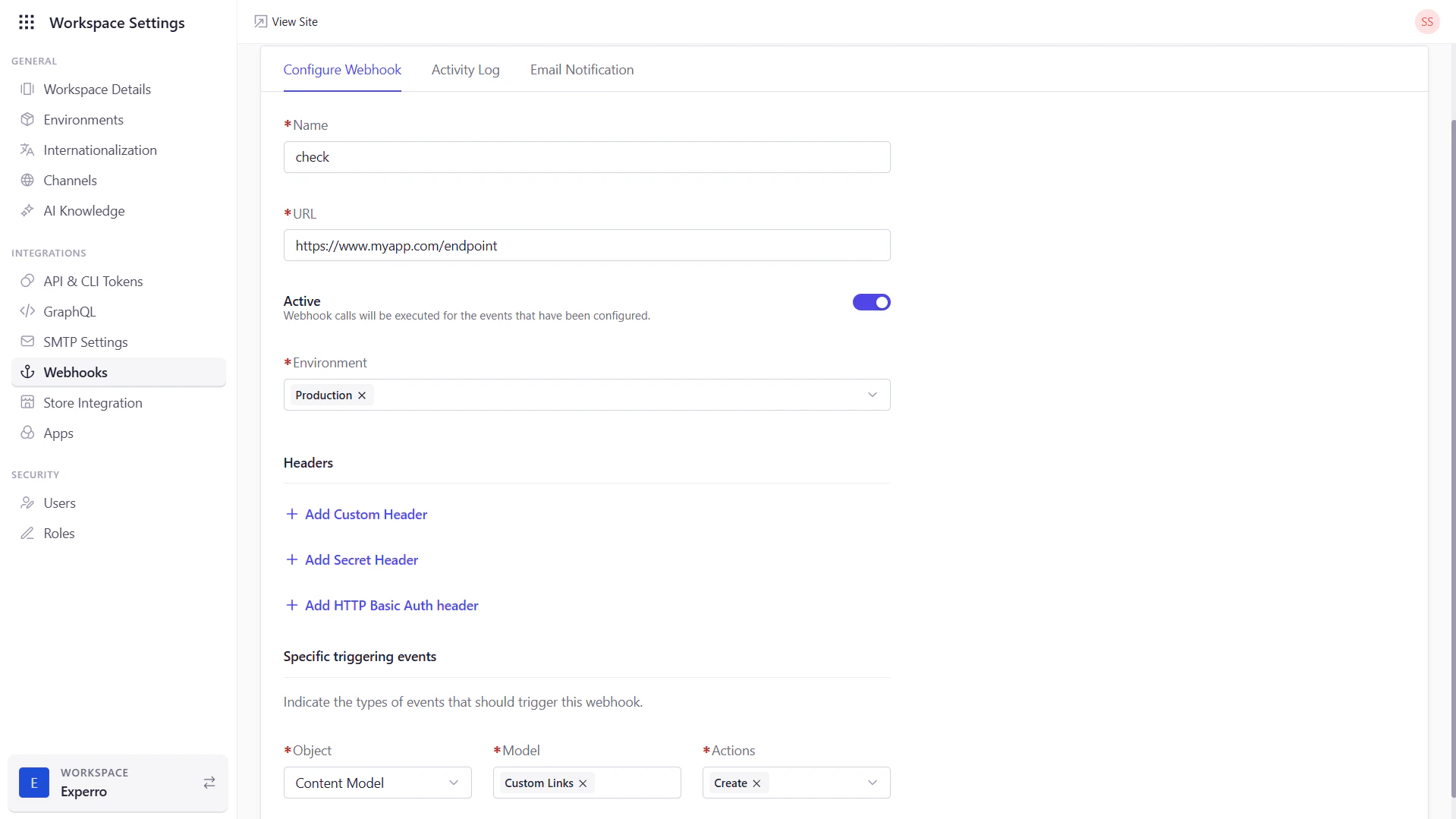 #### 1. Configure Webhook
| Field | Description |
| --------------------- | ---------------------------------------------------------------------------------------------------------------------------------------------------------------------------------------------------------------- |
| **Name** | A clear label for identification (e.g., “Inventory Update Notifier”). |
| **URL** | The target endpoint where Experro will POST event payloads. |
| **Active** | Toggle **On** to enable deliveries immediately; **Off** to pause without deleting. |
| **Environment** | Choose which environment(s) (Development, Staging, Production) should trigger this webhook. |
| **Custom Header** | Add arbitrary HTTP headers (e.g., `X-Signature: abc123`) to accompany each request. |
| **Secret Header** | Define a header (e.g., `X-Webhook-Secret`) containing a shared secret for verifying payload authenticity. |
| **HTTP Basic Auth** | Supply a key, value pair if your endpoint requires Basic Authentication. |
| **Triggering Events** | Select one or more event types by specifying the **Object** (e.g., `Order`), **Model** (e.g., `Order Created`), and **Action** (e.g., `create`, `update`, `delete`). Only these actions will invoke the webhook. |
| **Save** | Persist your settings. Once saved, the webhook becomes active if toggled on. |
#### 2. Activity Log
* Displays a chronological record of the webhook’s delivery attempts
* Helpful for debugging failures or verifying that downstream systems received data correctly.
#### 3. Email Notification
* **Notification Emails**: Comma-separated list of email addresses to alert when the webhook is automatically deactivated after repeated failures.
#### 1. Configure Webhook
| Field | Description |
| --------------------- | ---------------------------------------------------------------------------------------------------------------------------------------------------------------------------------------------------------------- |
| **Name** | A clear label for identification (e.g., “Inventory Update Notifier”). |
| **URL** | The target endpoint where Experro will POST event payloads. |
| **Active** | Toggle **On** to enable deliveries immediately; **Off** to pause without deleting. |
| **Environment** | Choose which environment(s) (Development, Staging, Production) should trigger this webhook. |
| **Custom Header** | Add arbitrary HTTP headers (e.g., `X-Signature: abc123`) to accompany each request. |
| **Secret Header** | Define a header (e.g., `X-Webhook-Secret`) containing a shared secret for verifying payload authenticity. |
| **HTTP Basic Auth** | Supply a key, value pair if your endpoint requires Basic Authentication. |
| **Triggering Events** | Select one or more event types by specifying the **Object** (e.g., `Order`), **Model** (e.g., `Order Created`), and **Action** (e.g., `create`, `update`, `delete`). Only these actions will invoke the webhook. |
| **Save** | Persist your settings. Once saved, the webhook becomes active if toggled on. |
#### 2. Activity Log
* Displays a chronological record of the webhook’s delivery attempts
* Helpful for debugging failures or verifying that downstream systems received data correctly.
#### 3. Email Notification
* **Notification Emails**: Comma-separated list of email addresses to alert when the webhook is automatically deactivated after repeated failures.