> ## Documentation Index
> Fetch the complete documentation index at: https://help.experro.com/llms.txt
> Use this file to discover all available pages before exploring further.
# Overview
Experro **Banners** empowers merchandisers to place promotional content (image, video or HTML) directly within **Search Results**, **Category Pages**, and **Collection Pages** — controlling what shoppers see and where they see it, at the exact moment when they are browsing and searching.
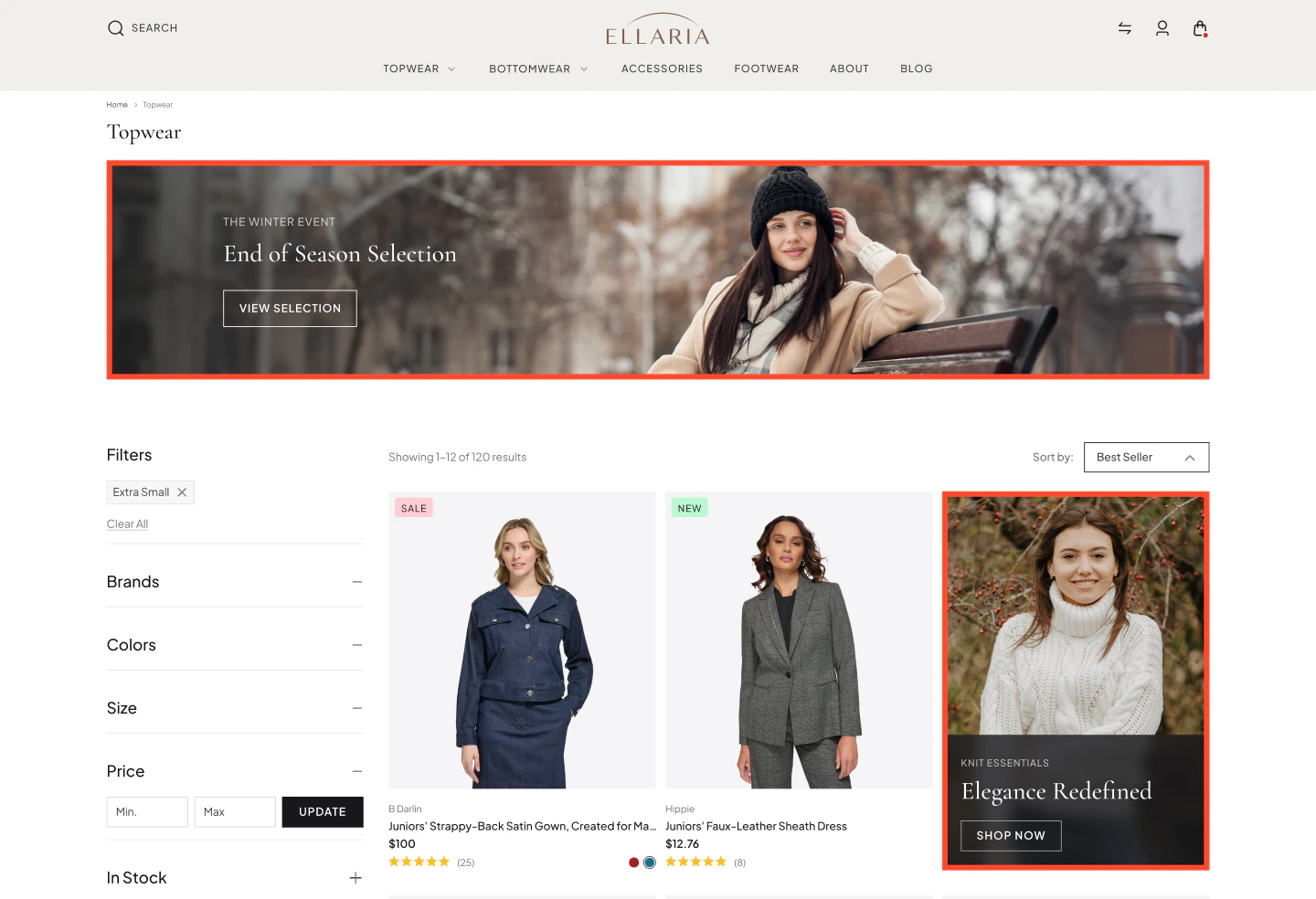 Whether you’re promoting seasonal sales, highlighting new collections, or driving traffic to high-value pages, Banners ensure your marketing appears exactly when shoppers are actively browsing or searching.
By blending placement flexibility with real-time preview and device-level control, Banners lets your team:
* **Promote campaigns in context** — surface a "Summer Sale" banner on search results for "swimwear" and "dresses", not sitewide.
* **Drive traffic to high-value pages** — redirect shoppers from a browse page directly to a new collection, brand landing page, or campaign PLP.
* **Reinforce brand partnerships** — display co-branded content on category pages during joint campaigns, without modifying the product catalog.
* **Capture high-intent moments** — meet shoppers with relevant offers when they are actively searching, not after they have already left.
* **React to seasonal trends** — launch and retire promotional banners on a schedule, with no manual cleanup required.
## What Are Banners?
Banners are promotional content units that appear within product discovery pages, configured and managed entirely from **Discovery → Banners**.
Each banner works on a **two-step model**:
1. [**Create and configure the banner**](/experro_discovery/banners) (content, layout, device behavior)
2. [**Attach it to a Merchandising Rule**](/experro_discovery/merchandising/rule_types/banner_rule) that controls where and when it appears
**Two-Step Model**\
Creating a banner does not make it live. A banner only appears on your storefront when it is attached to an active Merchandising Rule. See [**Using Discovery Dashboard: Banners**](/experro_discovery/merchandising/rule_types/banner_rule) for step-by-step setup instructions.
Unlike traditional merchandising methods, Banners do not interfere with product ranking or relevance. They enhance discovery by adding contextual promotions without altering how products are displayed.
### Banner Content Types
Banners support multiple content formats based on your campaign needs:
| **Type** | **Best For** |
| --------- | ----------------------------------------------------------------------------------------------------------------------------------------- |
| **Image** | Standard format for seasonal promotions, campaign creative, and brand placements. Supports PNG, JPG, AVIF, WEBP or GIF up to 2 MB. |
| **Video** | High-production campaigns where motion adds meaningful context. Supports video URLs from platforms like YouTube, Vimeo, Dailymotion, etc. |
| **HTML** | Advanced scenarios: countdown timers, dynamic copy, embedded interactive elements, personalized messaging. |
For optimal alignment, the banner dimensions should match the size of a single product tile in the PLP grid.
### Placement and Layout Control
Banners integrate directly into the product grid. Seven layout options control where the banner appears relative to products:
| **Layout** | **Where It Appears** |
| --------------- | --------------------------------------------------------------------------------- |
| **1x1** | Inline within the product grid, occupying the same space as a single product tile |
| **1x2** | Spans two product columns in a single row |
| **1x3** | Spans three product columns in a single row |
| **Full Width** | Stretches across the entire width of the product grid |
| **Top** | Above all products, before the grid begins |
| **Bottom** | Below all products, after the grid ends |
| **Below Facet** | Between the filter panel and the product grid |
Each layout can be configured independently for Desktop, Tablet, and Mobile, ensuring your banners adapt to different screen sizes without breaking the browsing experience.
**Example: "Summer Jewelry Sale" Banner**
A jewelry retailer is launching a 30% off summer sale. The goal is to promote it on search results pages — not sitewide — because shoppers searching for jewelry are the highest-intent audience.
1. **Banner Creative:** Full-width campaign image featuring the hero piece, with a "Shop Now" CTA linking to the sale collection page.
2. **Layout:** Full Width, positioned above the product grid to anchor the page without competing with product tiles.
3. **Device Configuration:** Landscape crop for Desktop and Tablet; a separate portrait crop for Mobile to preserve the focal point.
4. **Merchandising Rule:** A Search Rule targeting queries like "gold necklace," "diamond earrings," and "summer jewelry" — the banner appears only when shopper intent matches.
5. **Schedule:** Live June 15 to July 31. The rule can be scheduled to publish and run during a specific interval of date and time. The rule deactivates automatically — no manual cleanup required.
6. **Event Tracking:** The onload event tracks impressions, clicks, and other interactions, and sends this data to third-party marketing platforms. An Onclick event records CTR and passes click data to the retargeting platform.
| **Why It Works** |
| ------------------------------------------------------------------------------------------------------------------------------------------------------------------------------ |
| **Intent-matched placement:** Shoppers searching for jewelry see a jewelry sale — not a generic homepage banner they have already scrolled past. |
| **No ranking disruption:** The banner sits within the grid but does not alter which products appear or in what order. Discovery stays merit-based; promotion stays controlled. |
| **Measurable from day one:** Impression and click events are tracked the moment the rule goes live, giving the team real performance data before the campaign closes. |
Ready to build your first banner? See [**Using Discovery Dashboard → Banners**](/experro_discovery/banners) for step-by-step setup instructions.
Whether you’re promoting seasonal sales, highlighting new collections, or driving traffic to high-value pages, Banners ensure your marketing appears exactly when shoppers are actively browsing or searching.
By blending placement flexibility with real-time preview and device-level control, Banners lets your team:
* **Promote campaigns in context** — surface a "Summer Sale" banner on search results for "swimwear" and "dresses", not sitewide.
* **Drive traffic to high-value pages** — redirect shoppers from a browse page directly to a new collection, brand landing page, or campaign PLP.
* **Reinforce brand partnerships** — display co-branded content on category pages during joint campaigns, without modifying the product catalog.
* **Capture high-intent moments** — meet shoppers with relevant offers when they are actively searching, not after they have already left.
* **React to seasonal trends** — launch and retire promotional banners on a schedule, with no manual cleanup required.
## What Are Banners?
Banners are promotional content units that appear within product discovery pages, configured and managed entirely from **Discovery → Banners**.
Each banner works on a **two-step model**:
1. [**Create and configure the banner**](/experro_discovery/banners) (content, layout, device behavior)
2. [**Attach it to a Merchandising Rule**](/experro_discovery/merchandising/rule_types/banner_rule) that controls where and when it appears
**Two-Step Model**\
Creating a banner does not make it live. A banner only appears on your storefront when it is attached to an active Merchandising Rule. See [**Using Discovery Dashboard: Banners**](/experro_discovery/merchandising/rule_types/banner_rule) for step-by-step setup instructions.
Unlike traditional merchandising methods, Banners do not interfere with product ranking or relevance. They enhance discovery by adding contextual promotions without altering how products are displayed.
### Banner Content Types
Banners support multiple content formats based on your campaign needs:
| **Type** | **Best For** |
| --------- | ----------------------------------------------------------------------------------------------------------------------------------------- |
| **Image** | Standard format for seasonal promotions, campaign creative, and brand placements. Supports PNG, JPG, AVIF, WEBP or GIF up to 2 MB. |
| **Video** | High-production campaigns where motion adds meaningful context. Supports video URLs from platforms like YouTube, Vimeo, Dailymotion, etc. |
| **HTML** | Advanced scenarios: countdown timers, dynamic copy, embedded interactive elements, personalized messaging. |
For optimal alignment, the banner dimensions should match the size of a single product tile in the PLP grid.
### Placement and Layout Control
Banners integrate directly into the product grid. Seven layout options control where the banner appears relative to products:
| **Layout** | **Where It Appears** |
| --------------- | --------------------------------------------------------------------------------- |
| **1x1** | Inline within the product grid, occupying the same space as a single product tile |
| **1x2** | Spans two product columns in a single row |
| **1x3** | Spans three product columns in a single row |
| **Full Width** | Stretches across the entire width of the product grid |
| **Top** | Above all products, before the grid begins |
| **Bottom** | Below all products, after the grid ends |
| **Below Facet** | Between the filter panel and the product grid |
Each layout can be configured independently for Desktop, Tablet, and Mobile, ensuring your banners adapt to different screen sizes without breaking the browsing experience.
**Example: "Summer Jewelry Sale" Banner**
A jewelry retailer is launching a 30% off summer sale. The goal is to promote it on search results pages — not sitewide — because shoppers searching for jewelry are the highest-intent audience.
1. **Banner Creative:** Full-width campaign image featuring the hero piece, with a "Shop Now" CTA linking to the sale collection page.
2. **Layout:** Full Width, positioned above the product grid to anchor the page without competing with product tiles.
3. **Device Configuration:** Landscape crop for Desktop and Tablet; a separate portrait crop for Mobile to preserve the focal point.
4. **Merchandising Rule:** A Search Rule targeting queries like "gold necklace," "diamond earrings," and "summer jewelry" — the banner appears only when shopper intent matches.
5. **Schedule:** Live June 15 to July 31. The rule can be scheduled to publish and run during a specific interval of date and time. The rule deactivates automatically — no manual cleanup required.
6. **Event Tracking:** The onload event tracks impressions, clicks, and other interactions, and sends this data to third-party marketing platforms. An Onclick event records CTR and passes click data to the retargeting platform.
| **Why It Works** |
| ------------------------------------------------------------------------------------------------------------------------------------------------------------------------------ |
| **Intent-matched placement:** Shoppers searching for jewelry see a jewelry sale — not a generic homepage banner they have already scrolled past. |
| **No ranking disruption:** The banner sits within the grid but does not alter which products appear or in what order. Discovery stays merit-based; promotion stays controlled. |
| **Measurable from day one:** Impression and click events are tracked the moment the rule goes live, giving the team real performance data before the campaign closes. |
Ready to build your first banner? See [**Using Discovery Dashboard → Banners**](/experro_discovery/banners) for step-by-step setup instructions.