> ## Documentation Index
> Fetch the complete documentation index at: https://help.experro.com/llms.txt
> Use this file to discover all available pages before exploring further.
# Metrics
Metrics define what success means for the experiment. Experro measures every variant against the metrics you set here and uses the primary metric to decide the winning variant.
## Primary and Secondary Metrics
A **primary metric** is the single KPI the experiment is designed to move. It determines the winner, so pick the one that maps most directly to the business outcome you care about. Exactly one is required.
**Secondary metrics** are tracked alongside it. They explain how and why the primary moved, and they catch damage elsewhere in the funnel. They never decide the winner.
Suppose add to cart is your primary metric. Revenue and checkout rate make good secondary metrics — more carts only help if they convert and order value holds.
## Configuration Details
Each metric has two fields. Both are required.
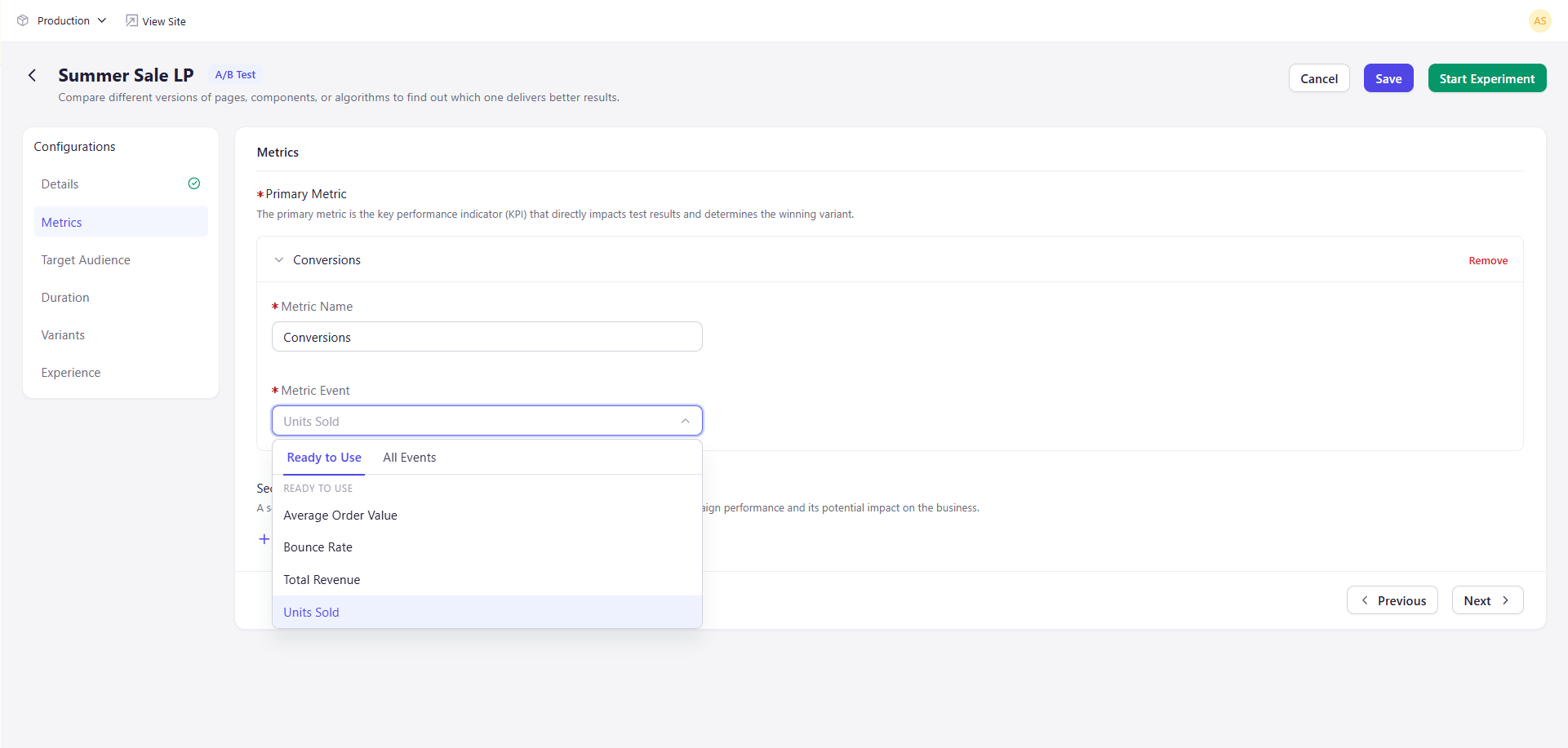 | Field | Description |
| ---------------- | --------------------------------------------------------- |
| **Metric Name** | A label for reports. Free text. |
| **Metric Event** | The event this metric measures. Choose from the dropdown. |
## Choosing a Metric Event
**Metric Event** opens a two-part list. **Ready to Use** holds prepared business metrics. **All Events** holds the raw storefront events your site sends. Tabs at the top filter between the two.
| Group | Options |
| ---------------- | --------------------------------------------------------------------------------------------------------------------------------------------------------------------------------------------------------------------------------------------------------------------------------------------- |
| **Ready to Use** | Average Order Value, Bounce Rate, Total Revenue, Units Sold |
| **All Events** | Cart Viewed, Category Viewed, Checkout Completed, Checkout Initiated, Collection Viewed, Component Clicked, Component Viewed, Page Leave, Page View, Product Added to Cart, Product Removed from Cart, Product Searched, Product Searched Zero Result, Product Variant Viewed, Product Viewed |
Pick the event that reflects what you are changing. A checkout redesign is measured on Checkout Completed. A merchandising change is measured on Units Sold.
**Metric Name** is a label only. It does not have to match the event you choose, so name it for the question you are answering.
Keep secondary metrics to the few that would genuinely change your decision. A long list makes results harder to read, not richer.
## What's Next
* [Target Audience](/experiments/a_b_testing/target_audience)
| Field | Description |
| ---------------- | --------------------------------------------------------- |
| **Metric Name** | A label for reports. Free text. |
| **Metric Event** | The event this metric measures. Choose from the dropdown. |
## Choosing a Metric Event
**Metric Event** opens a two-part list. **Ready to Use** holds prepared business metrics. **All Events** holds the raw storefront events your site sends. Tabs at the top filter between the two.
| Group | Options |
| ---------------- | --------------------------------------------------------------------------------------------------------------------------------------------------------------------------------------------------------------------------------------------------------------------------------------------- |
| **Ready to Use** | Average Order Value, Bounce Rate, Total Revenue, Units Sold |
| **All Events** | Cart Viewed, Category Viewed, Checkout Completed, Checkout Initiated, Collection Viewed, Component Clicked, Component Viewed, Page Leave, Page View, Product Added to Cart, Product Removed from Cart, Product Searched, Product Searched Zero Result, Product Variant Viewed, Product Viewed |
Pick the event that reflects what you are changing. A checkout redesign is measured on Checkout Completed. A merchandising change is measured on Units Sold.
**Metric Name** is a label only. It does not have to match the event you choose, so name it for the question you are answering.
Keep secondary metrics to the few that would genuinely change your decision. A long list makes results harder to read, not richer.
## What's Next
* [Target Audience](/experiments/a_b_testing/target_audience)