> ## Documentation Index
> Fetch the complete documentation index at: https://help.experro.com/llms.txt
> Use this file to discover all available pages before exploring further.
# End an Experiment
An A/B test finishes in one of two ways: you end it yourself, or it reaches the end date you configured. Either way, the last step is the same — choose the winning variant.
## End an Experiment Manually
Open the experiment and click **Configure Experiment**. The **End Experiment** button sits in the top-right controls.
The Select Winning Variant dialog shows each group with its average value, total, and sessions.
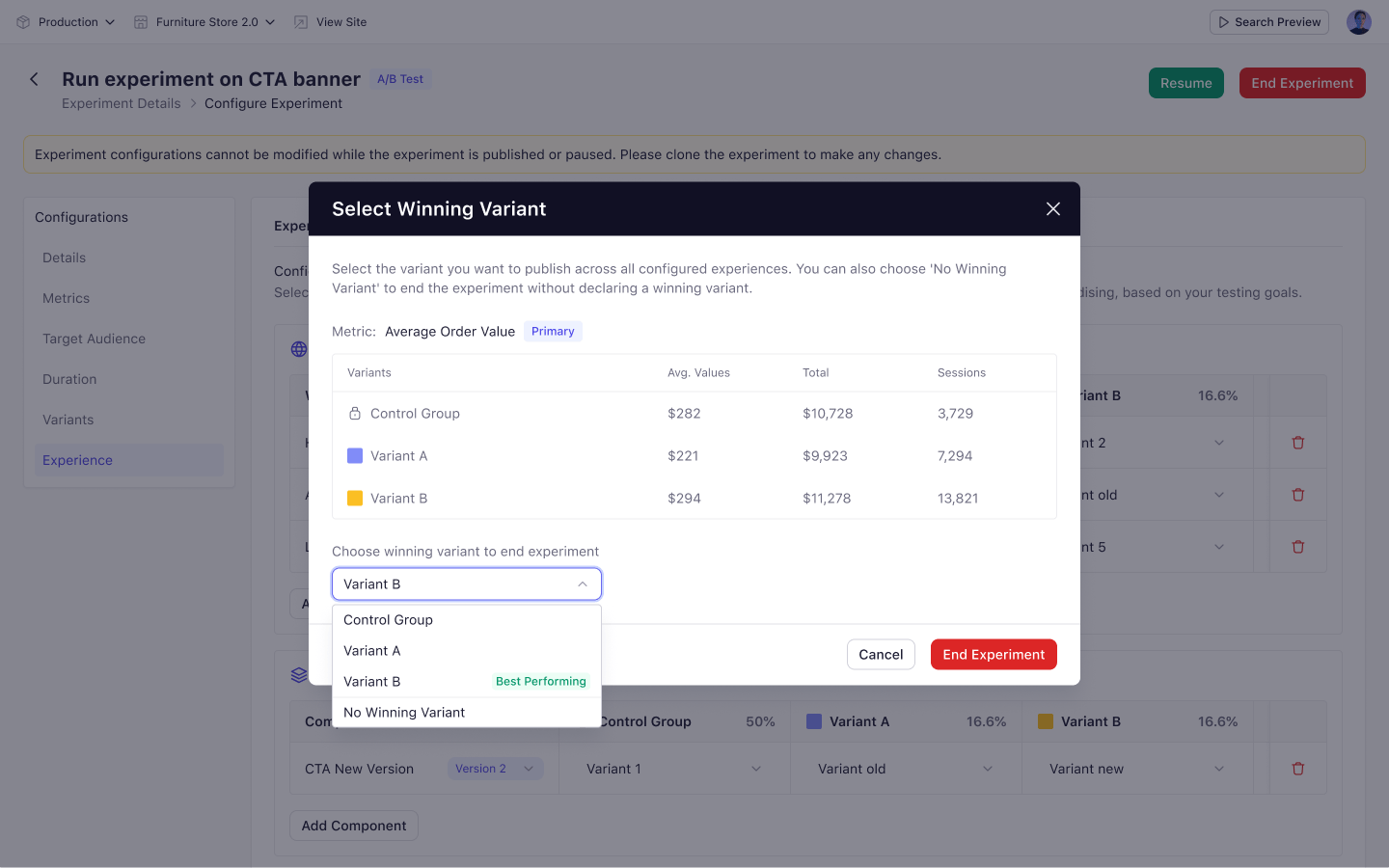 The variant with the highest average value is selected by default. Choose a different one if you want, or select **No winning variant** to close the test without declaring one.
Click **End Experiment**. The status changes to **Completed**.
## When an Experiment Ends Automatically
An experiment ends on its own when the end date arrives. Experro emails the recipients configured on the **Duration** step.
The experiment then appears as **Completed** in the list with a caution icon beside its name, showing that it still needs a decision.
Open it and you will see a banner:
> The experiment has ended. Click Conclude Experiment to choose the winning variant and conclude the experiment.
Click **Conclude Experiment** to open the same Select Winning Variant dialog and finish the process.
## After an Experiment Ends
* Configuration becomes read-only.
* **Pause** and **End Experiment** are removed. **Clone** and **Delete** remain.
* Visitors previously enrolled see the control experience and become eligible for other experiments on their next visit.
Personalization experiments cannot be ended manually. When they reach their end condition they return to **Draft** instead of completing.
Ending an experiment is final. To keep collecting data, pause it instead.
## What's Next
* [Clone and Delete Experiments](/experiments/managing_experiments/clone_and_delete_an_experiment)
* [View Experiment Results](/experiments/analytics/overview)
The variant with the highest average value is selected by default. Choose a different one if you want, or select **No winning variant** to close the test without declaring one.
Click **End Experiment**. The status changes to **Completed**.
## When an Experiment Ends Automatically
An experiment ends on its own when the end date arrives. Experro emails the recipients configured on the **Duration** step.
The experiment then appears as **Completed** in the list with a caution icon beside its name, showing that it still needs a decision.
Open it and you will see a banner:
> The experiment has ended. Click Conclude Experiment to choose the winning variant and conclude the experiment.
Click **Conclude Experiment** to open the same Select Winning Variant dialog and finish the process.
## After an Experiment Ends
* Configuration becomes read-only.
* **Pause** and **End Experiment** are removed. **Clone** and **Delete** remain.
* Visitors previously enrolled see the control experience and become eligible for other experiments on their next visit.
Personalization experiments cannot be ended manually. When they reach their end condition they return to **Draft** instead of completing.
Ending an experiment is final. To keep collecting data, pause it instead.
## What's Next
* [Clone and Delete Experiments](/experiments/managing_experiments/clone_and_delete_an_experiment)
* [View Experiment Results](/experiments/analytics/overview)