> ## Documentation Index
> Fetch the complete documentation index at: https://help.experro.com/llms.txt
> Use this file to discover all available pages before exploring further.
# Target Audience
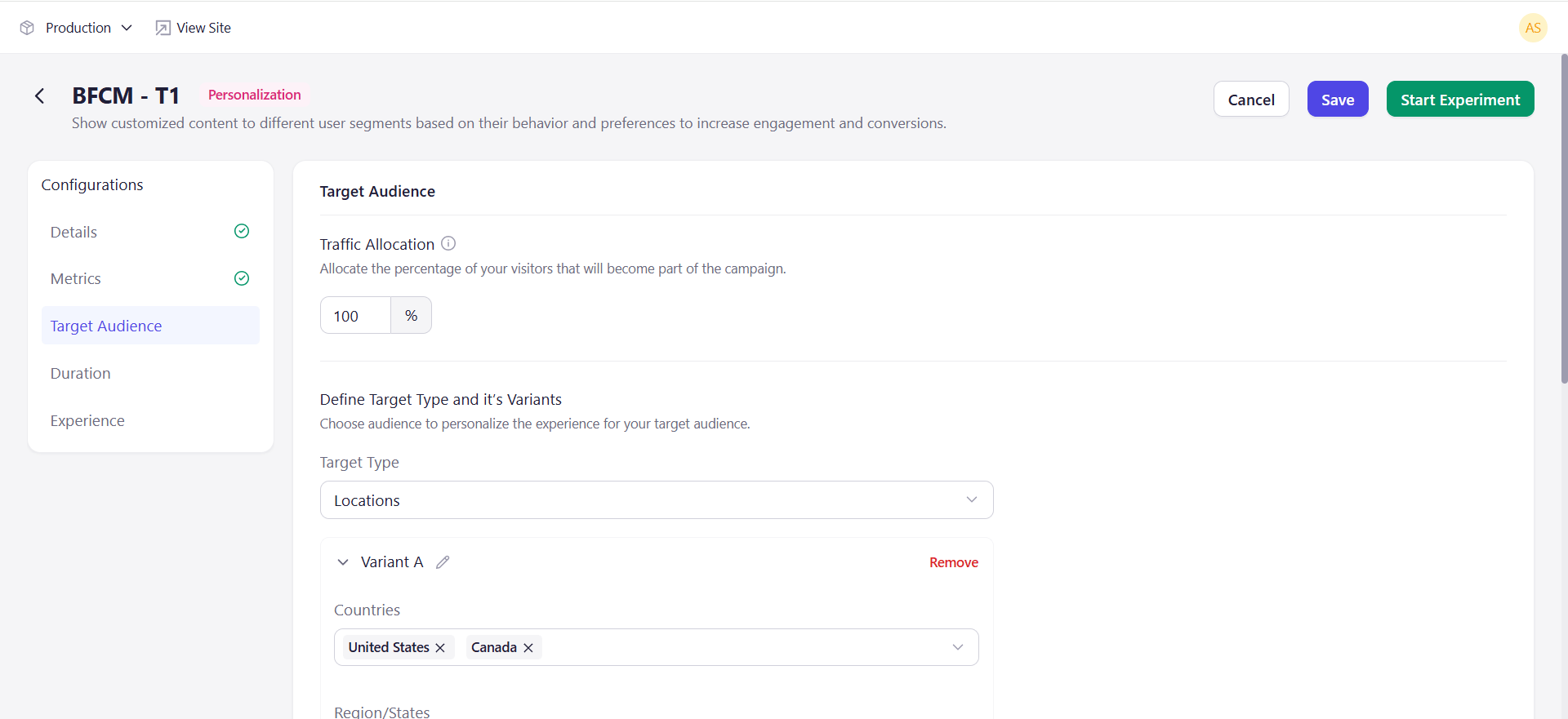
Target Audience is where a personalization experiment takes shape. It sets how many visitors take part, and it defines the variants along with the audience each one serves.
## Traffic Allocation
Traffic allocation sets the percentage of your visitors who become part of the campaign, from 1 to 100. It defaults to 100.
Lower it to introduce a personalized experience gradually. If your site gets 100 visitors a day and you want 20 of them in the experiment, set it to 20%.
This is one figure for the whole experiment. Personalization has no control group and does not divide traffic between variants. Which variant a visitor receives depends on the audience they match, not on a percentage split.
## Define Target Type and Its Variants
**Target Type** is chosen once and governs the whole experiment. Each variant then holds its own values for that one type — you cannot target one variant by location and another by device.
| Target Type | Targets |
| ------------------ | --------------------------------------------------------------------- |
| **Segments** | Predefined user groups, based on demographic or behavioral attributes |
| **UTM Parameters** | Users arriving via specific ad campaigns or UTM parameters |
| **Locations** | Users by geographic location |
| **Devices** | Users by device type, such as mobile or desktop |
Below the dropdown, each variant appears as its own block. Use the pencil to rename a variant, **Remove** to delete one, and **Add Variant** to add another.
The fields inside a block depend on the type. **Locations** offers Countries, Region/States, and Cities.
 ## Worked Example
A two-variant experiment with **Target Type** set to **Locations**:
| Variant | Countries | Region/States | Cities |
| --------- | --------- | ----------------------------------- | ----------------------- |
| Variant A | India | National Capital Territory of Delhi | Delhi |
| Variant B | India | Andhra Pradesh | Anaparthy, Chipurupalle |
A visitor browsing from Delhi receives Variant A. A visitor browsing from Anaparthy receives Variant B.
## Key Considerations
* Every variant needs values before the experiment can start.
* **Target Type** applies to the whole experiment. Changing it changes it for every variant.
* Check that each set of values matches meaningful traffic before launching. A variant targeted at a few dozen visitors a week will not produce readable results.
## What's Next
* [Condition Based Targeting](/experiments/targeting/condition_based_targeting)
* [Duration](/experiments/personalization/duration)
## Worked Example
A two-variant experiment with **Target Type** set to **Locations**:
| Variant | Countries | Region/States | Cities |
| --------- | --------- | ----------------------------------- | ----------------------- |
| Variant A | India | National Capital Territory of Delhi | Delhi |
| Variant B | India | Andhra Pradesh | Anaparthy, Chipurupalle |
A visitor browsing from Delhi receives Variant A. A visitor browsing from Anaparthy receives Variant B.
## Key Considerations
* Every variant needs values before the experiment can start.
* **Target Type** applies to the whole experiment. Changing it changes it for every variant.
* Check that each set of values matches meaningful traffic before launching. A variant targeted at a few dozen visitors a week will not produce readable results.
## What's Next
* [Condition Based Targeting](/experiments/targeting/condition_based_targeting)
* [Duration](/experiments/personalization/duration)