> ## Documentation Index
> Fetch the complete documentation index at: https://help.experro.com/llms.txt
> Use this file to discover all available pages before exploring further.
# Configure Algorithm
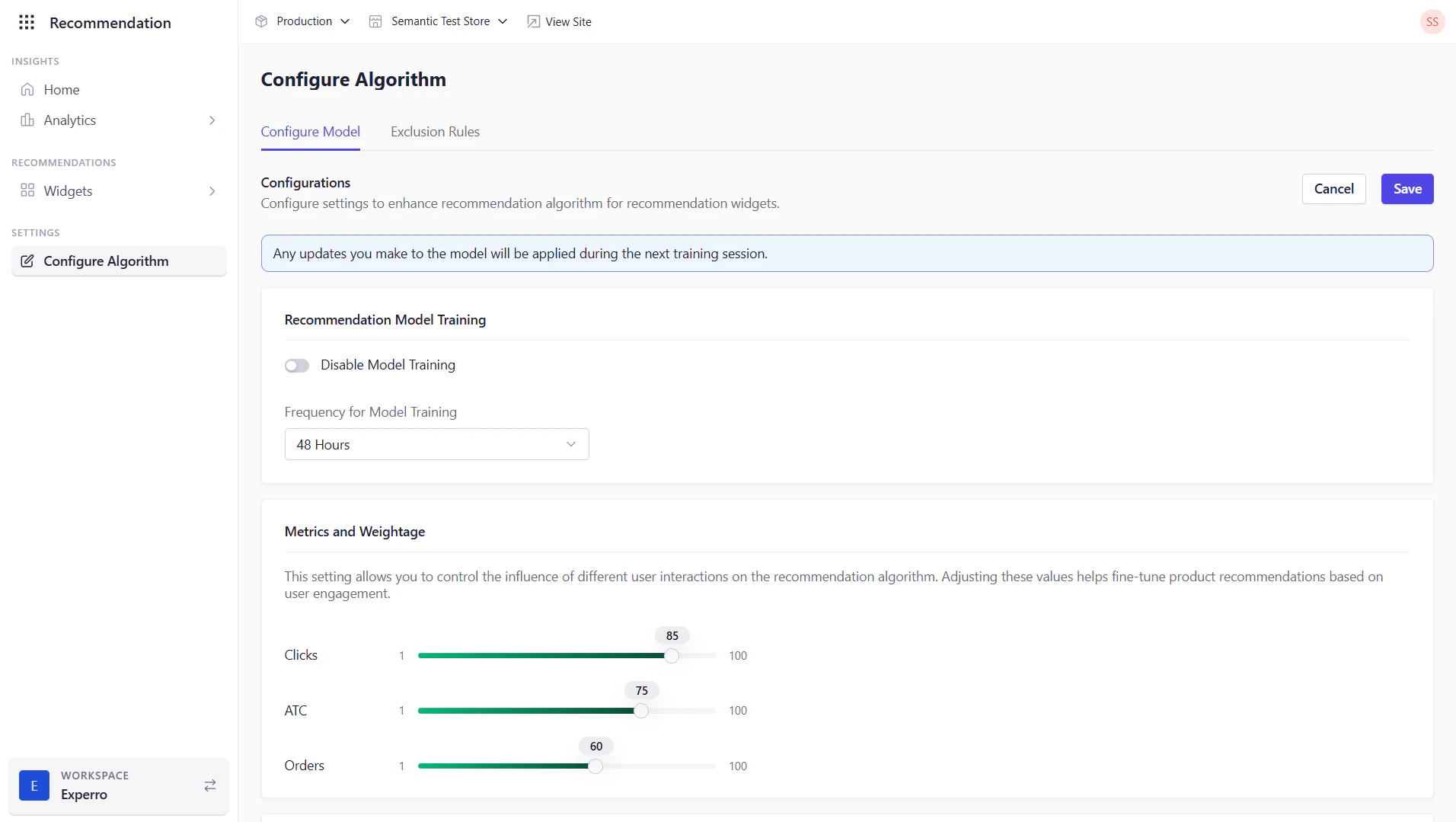
Use this page to fine-tune how Experro’s AI recommendation algorithms behave for each widget. You can select or swap models, adjust training cadence, weight user actions, set similarity attributes, and define session-based rules—all without touching code.
Any updates you make to the model will be applied during the next training session.
 ## Configurations
### Recommendation Model Training
* **Disable Model Training** (toggle)\
Turn off automated training if you want to freeze the model in its current state.
* **Frequency for Model Training**\
Specify how often (in days) Experro retrains this algorithm with fresh data. This field is available on if you keep the **Disable Model Training** toggle off.
Example: “Weekly” runs weekly retraining.
### Metrics & Weightage
Adjust how much each type of user interaction influences your recommendations:
* **Clicks**
* **Add to Cart**
* **Orders**
## Configurations
### Recommendation Model Training
* **Disable Model Training** (toggle)\
Turn off automated training if you want to freeze the model in its current state.
* **Frequency for Model Training**\
Specify how often (in days) Experro retrains this algorithm with fresh data. This field is available on if you keep the **Disable Model Training** toggle off.
Example: “Weekly” runs weekly retraining.
### Metrics & Weightage
Adjust how much each type of user interaction influences your recommendations:
* **Clicks**
* **Add to Cart**
* **Orders**
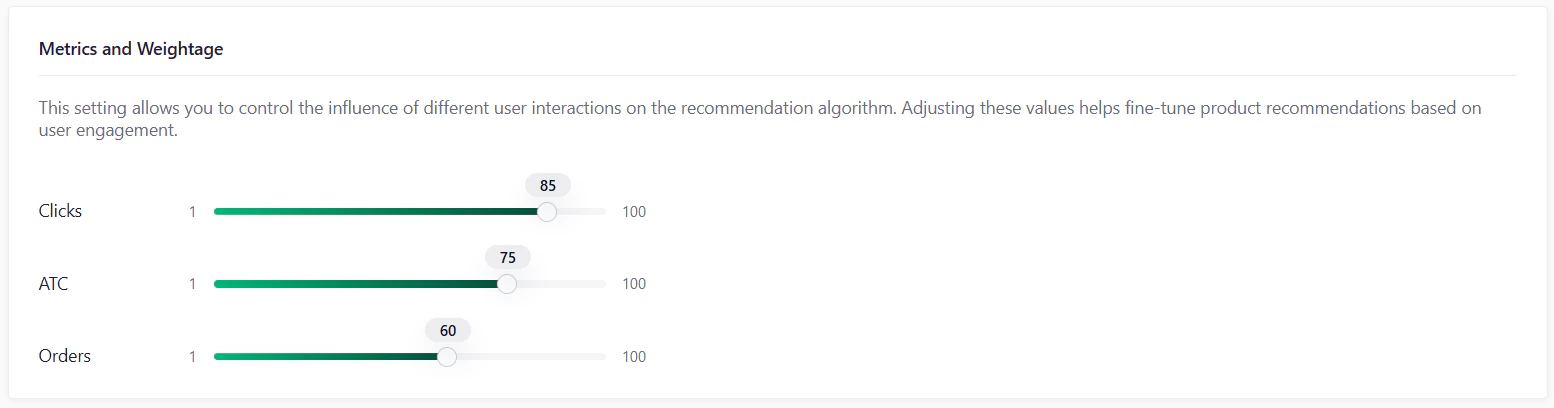 - Increase the weight for “Orders” to prioritize products that actually convert.
- Increase the weight for “Add to Cart” to promote products that are actively considered but not yet purchased.
- Increase the weight for “Clicks” to surface products that are frequently engaged with but not necessarily bought.
### Timeframe
Sliding window (in days) over which user activities are considered for generating personalized recommendations. Behaviors older than this window have diminishing influence.
 Set a longer timeframe if you want to capture long-term browsing patterns. A shorter window is useful for reflecting recent trends and seasonality.
### Threshold Value
Threshold Value for Recommendation AI Model. Controls how “strict” or “broad” matches must be for recommendations to surface.
* **Guidance:**
* Lower = broader matches (risk of irrelevant suggestions)
* Higher = stricter relevance (fewer but more accurate picks)
Set a longer timeframe if you want to capture long-term browsing patterns. A shorter window is useful for reflecting recent trends and seasonality.
### Threshold Value
Threshold Value for Recommendation AI Model. Controls how “strict” or “broad” matches must be for recommendations to surface.
* **Guidance:**
* Lower = broader matches (risk of irrelevant suggestions)
* Higher = stricter relevance (fewer but more accurate picks)
 To change this setting beyond the UI default, please contact our support team.
### Attributes for Similarity
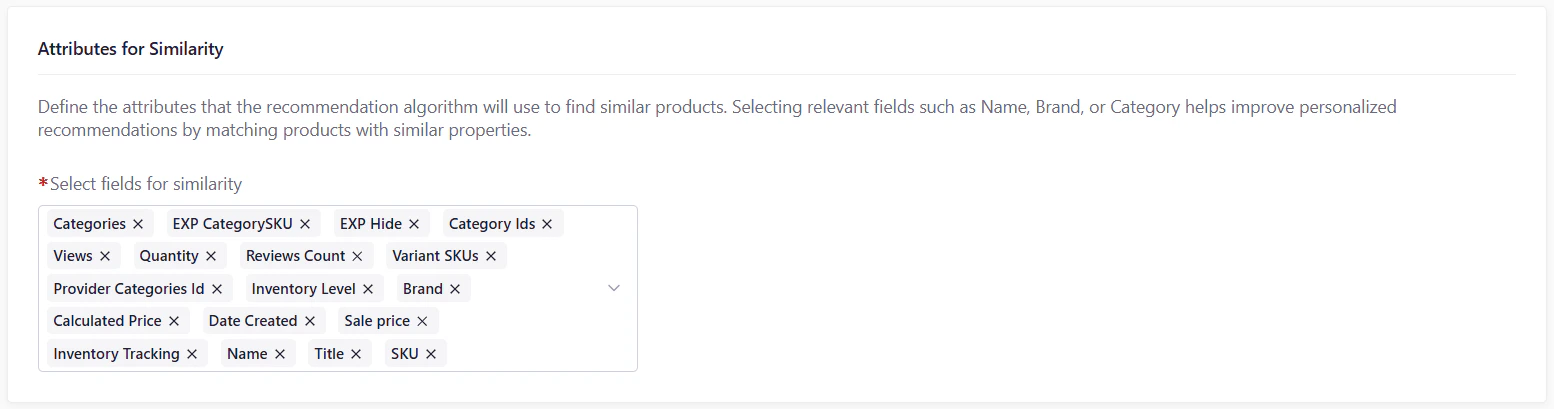
Select fields for similarity. Pick the product attributes (e.g., Name, Brand, Category, Price) that the algorithm uses to determine “similarity”. Matching on the right attributes ensures more meaningful “Similar Products” and “Frequently Viewed Together” recommendations.
To change this setting beyond the UI default, please contact our support team.
### Attributes for Similarity
Select fields for similarity. Pick the product attributes (e.g., Name, Brand, Category, Price) that the algorithm uses to determine “similarity”. Matching on the right attributes ensures more meaningful “Similar Products” and “Frequently Viewed Together” recommendations.
 ### Configure Algorithm Sessions
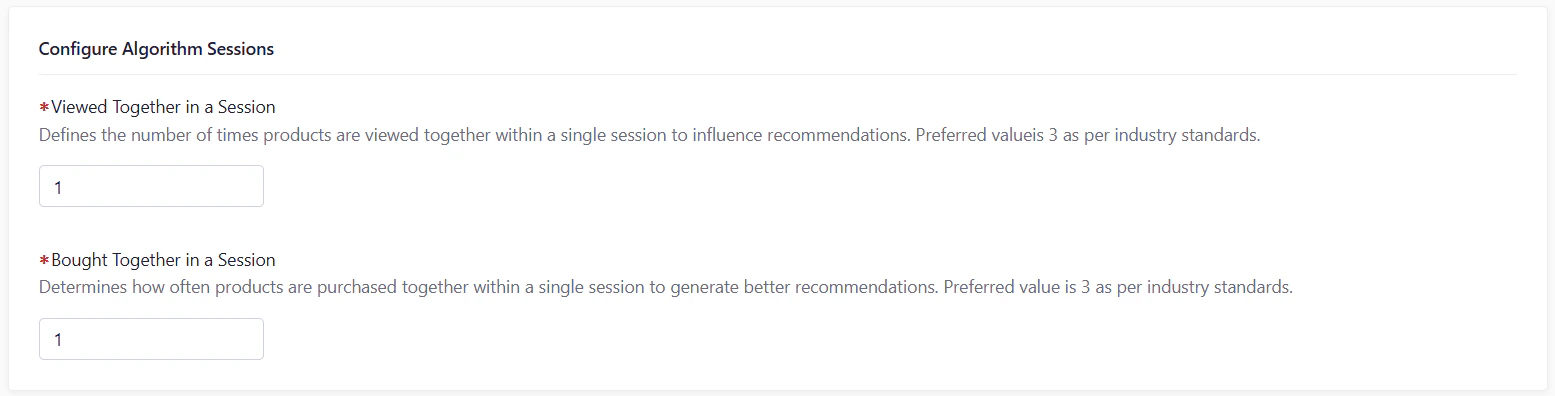
Fine-tune how Experro interprets in-session user behavior to train co-occurrence-based recommendation algorithms more accurately. By defining the minimum number of interactions required for signals to be counted as meaningful, you can balance precision with coverage across your catalog.
### Configure Algorithm Sessions
Fine-tune how Experro interprets in-session user behavior to train co-occurrence-based recommendation algorithms more accurately. By defining the minimum number of interactions required for signals to be counted as meaningful, you can balance precision with coverage across your catalog.
 | Metric | Description |
| -------------------------------- | ----------------------------------------------------------------------------------------------------------------------------------- |
| **Viewed Together in a Session** | The number of times a product needs to be viewed in the same session as another product to be considered a “viewed together” match. |
| **Bought Together in a Session** | The number of times a product needs to be bought in the same session as another product to be considered a "bought together" match. |
Setting these to “3” is recommended for most catalogs as per the industry standards.
## Exclusion Rules
Use **Exclusion Rules** to prevent certain SKUs or categories from ever appearing in a widget’s results.
| Metric | Description |
| -------------------------------- | ----------------------------------------------------------------------------------------------------------------------------------- |
| **Viewed Together in a Session** | The number of times a product needs to be viewed in the same session as another product to be considered a “viewed together” match. |
| **Bought Together in a Session** | The number of times a product needs to be bought in the same session as another product to be considered a "bought together" match. |
Setting these to “3” is recommended for most catalogs as per the industry standards.
## Exclusion Rules
Use **Exclusion Rules** to prevent certain SKUs or categories from ever appearing in a widget’s results.
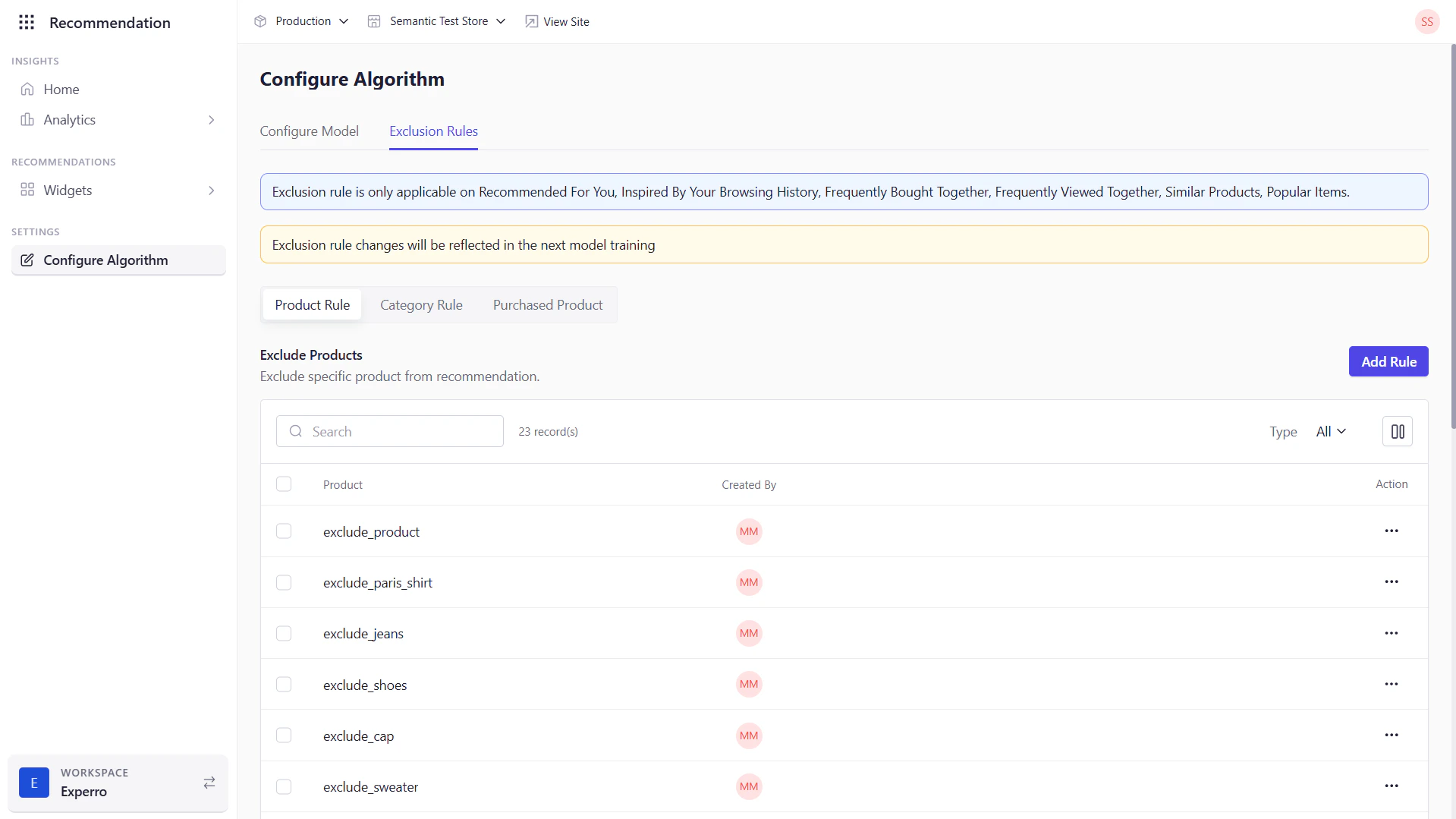 1. Navigate to the **Exclusion Rules** tab.
2. Next, select the **Product Rule** or **Category Rule** tab to exclude specific products or categories from a widget. Select **Purchased Product** to exclude products that have been purchased.
3. Add Products or Categories to exclude based on the tab that you have selected.
Once you’ve finished configuring each section above, click **Save** to confirm your changes. Your new settings will take effect with the next model training cycle—delivering more precise, personalized suggestions on your storefront.
1. Navigate to the **Exclusion Rules** tab.
2. Next, select the **Product Rule** or **Category Rule** tab to exclude specific products or categories from a widget. Select **Purchased Product** to exclude products that have been purchased.
3. Add Products or Categories to exclude based on the tab that you have selected.
Once you’ve finished configuring each section above, click **Save** to confirm your changes. Your new settings will take effect with the next model training cycle—delivering more precise, personalized suggestions on your storefront.