> ## Documentation Index
> Fetch the complete documentation index at: https://help.experro.com/llms.txt
> Use this file to discover all available pages before exploring further.
# Default templates
When you create a new page (or a Record) in the Admin Panel, you'll get an option to use (or attach) the template with the new page.
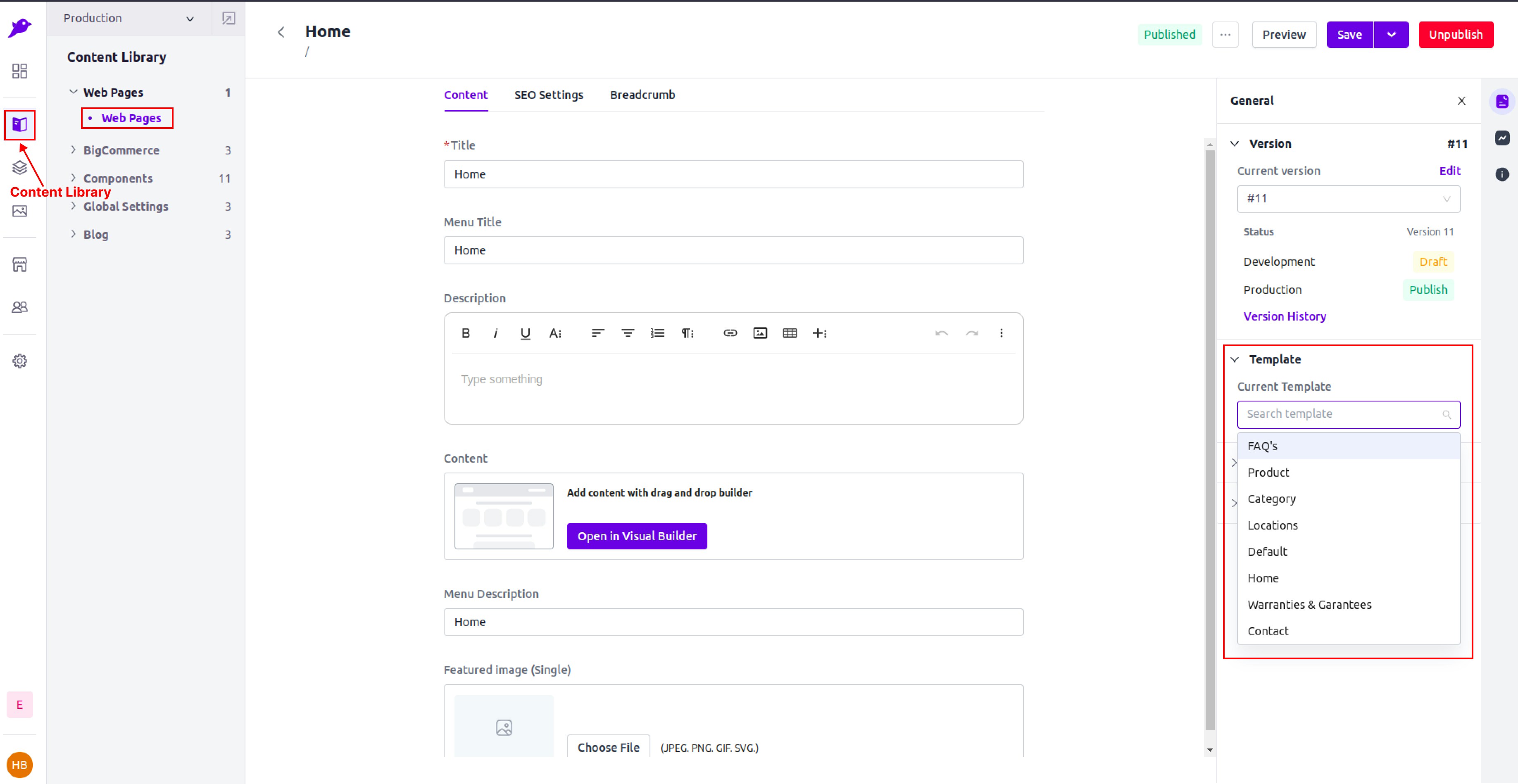 Based on this association, the page content and layout will show up.
In the base theme, the default templates are located in `src/templates` folder. The template list, you're seeing in the Admin Panel matches with the list of templates mentioned in `src/templates/template-list.ts` file. This file contains the existing list of the default templates.
`cms-page.tsx` or CMS Page Template is the default template. When you create a new page in the Admin Panel, the CMS Page Template is by default attached with the new page unless you specify other template.
Default template component has the access to `pageData` and `components` props. In template component, you should see the following basic structure:
```tsx theme={null}
const HomePage = ({ pageData, components }: HomePageProps) => {
return (
);
};
export default HomePage;
```
The `pageData` contains the information of the global settings, page title, description, etc. whereas `components` contains the information about the dragged components in the Visual Builder Draggable Area.
The dragged components are rendered using by `` from `experro-storefront`.
Theme developers have the freedom to create [custom templates](./custom-templates) according to their specific needs and requirements, allowing for complete control over template creation.
Based on this association, the page content and layout will show up.
In the base theme, the default templates are located in `src/templates` folder. The template list, you're seeing in the Admin Panel matches with the list of templates mentioned in `src/templates/template-list.ts` file. This file contains the existing list of the default templates.
`cms-page.tsx` or CMS Page Template is the default template. When you create a new page in the Admin Panel, the CMS Page Template is by default attached with the new page unless you specify other template.
Default template component has the access to `pageData` and `components` props. In template component, you should see the following basic structure:
```tsx theme={null}
const HomePage = ({ pageData, components }: HomePageProps) => {
return (
);
};
export default HomePage;
```
The `pageData` contains the information of the global settings, page title, description, etc. whereas `components` contains the information about the dragged components in the Visual Builder Draggable Area.
The dragged components are rendered using by `` from `experro-storefront`.
Theme developers have the freedom to create [custom templates](./custom-templates) according to their specific needs and requirements, allowing for complete control over template creation.