> ## Documentation Index
> Fetch the complete documentation index at: https://help.experro.com/llms.txt
> Use this file to discover all available pages before exploring further.
# Routing
Routing in React refers to the process of defining and managing the different paths or URLs of a web application and rendering the appropriate components based on the current URL.
Base theme support two types of routing.
1. Dynamic Routing
2. Custom Routing
## Type 1 - Dynamic Routing
Base theme provides *dynamic routing* based on *page slug* provided in the Experro admin panel.
Let's assume that we're interested in creating an *About Us* page in our base theme. Login into the Experro Admin Panel and add a new web page with `Record Name` and `Page Slug` values.
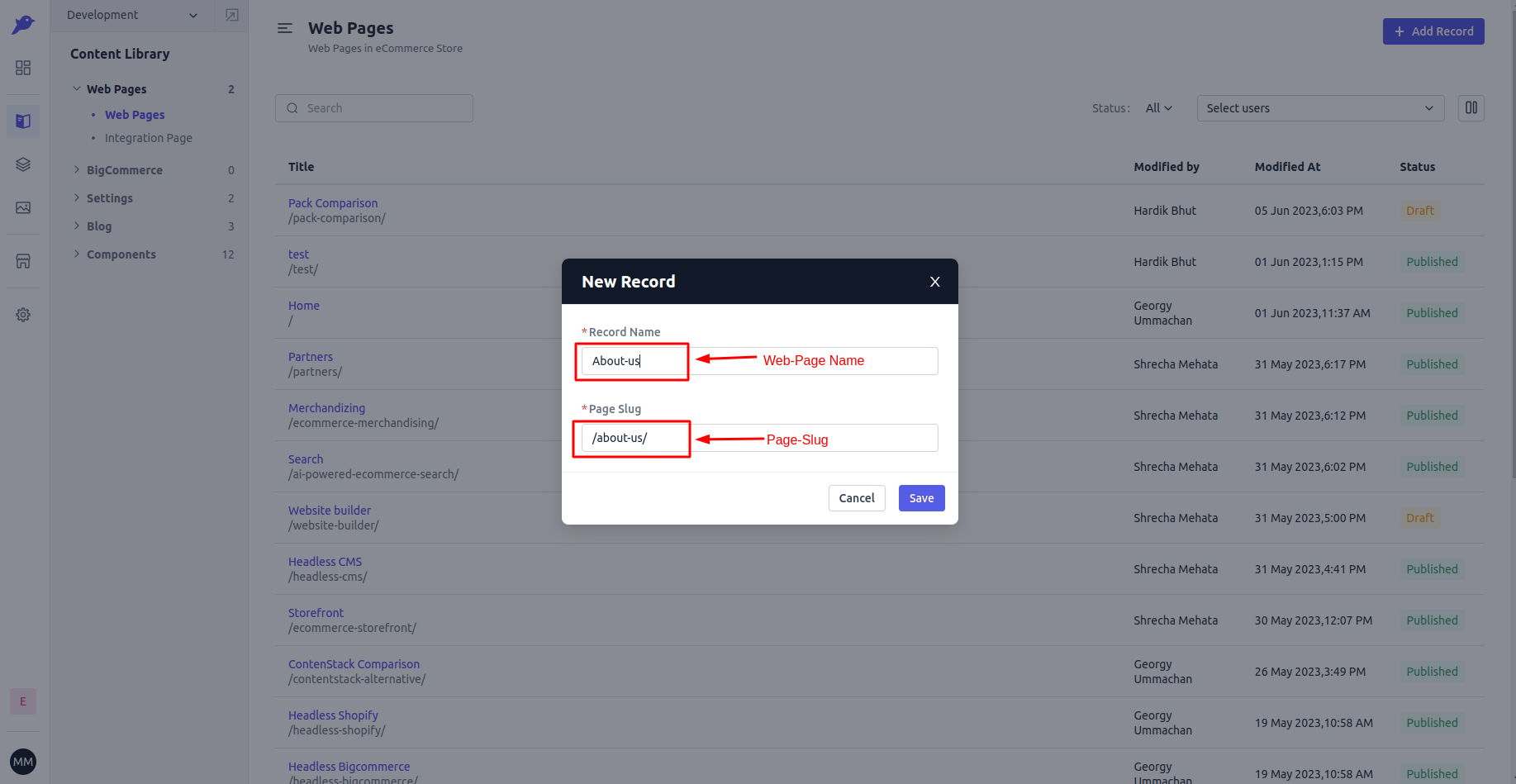 With this, you now have the `/about-us/` route in Base theme and it is handled *dynamically* by base theme and Experro Storefront.
You just need to hit that route with the respective domain name to view that page with page-slug. However, it's important to note that the specific record associated with that route(page-slug) needs to be published in order for it to be accessible.
## Type 2 - Custom Routing
With custom routing, you can attach the route to specific template in base theme.
Let's understand the custom routing with an example. In `templates` folder we have one file with name `blog-list.tsx` and we want to display the content of this file when user visit the `/blog-list` route.
We just need to register the template against route in `route-list.tsx` and Experro Storefront will handle the remaining.
The `route-list.tsx` is located at `src/routes` file.
```txt theme={null}
src
└── routes
├── index.ts
└── route-list.tsx
```
If you open this `route-list.tsx` file, you should see an array with name `Routes`. This array is collection of custom routes defined as an object. Add an object for `/blog-list` route in this object using the following code:
```js theme={null}
import { Page } from 'experro-storefront';
import components from '../components';
import templates from '../templates';
import BlogList from '../templates/blog-list';
const Routes = [
// ... other routes entry.
{
path: '/blog-list',
key: 'blog-list',
element: (
),
},
]
export default Routes;
```
`Page` component from `experro-storefront` is responsible for rendering the template for given custom route. TRoutinghe `Page` component accepts a `component`, `templates`, `componentToLoad` (template that we're interested to render), and unique `key` props.
With this, you now have the `/about-us/` route in Base theme and it is handled *dynamically* by base theme and Experro Storefront.
You just need to hit that route with the respective domain name to view that page with page-slug. However, it's important to note that the specific record associated with that route(page-slug) needs to be published in order for it to be accessible.
## Type 2 - Custom Routing
With custom routing, you can attach the route to specific template in base theme.
Let's understand the custom routing with an example. In `templates` folder we have one file with name `blog-list.tsx` and we want to display the content of this file when user visit the `/blog-list` route.
We just need to register the template against route in `route-list.tsx` and Experro Storefront will handle the remaining.
The `route-list.tsx` is located at `src/routes` file.
```txt theme={null}
src
└── routes
├── index.ts
└── route-list.tsx
```
If you open this `route-list.tsx` file, you should see an array with name `Routes`. This array is collection of custom routes defined as an object. Add an object for `/blog-list` route in this object using the following code:
```js theme={null}
import { Page } from 'experro-storefront';
import components from '../components';
import templates from '../templates';
import BlogList from '../templates/blog-list';
const Routes = [
// ... other routes entry.
{
path: '/blog-list',
key: 'blog-list',
element: (
),
},
]
export default Routes;
```
`Page` component from `experro-storefront` is responsible for rendering the template for given custom route. TRoutinghe `Page` component accepts a `component`, `templates`, `componentToLoad` (template that we're interested to render), and unique `key` props.